The best app for writing chord charts is the one that lets you enter a band chart one bar (measure) at a time, as fast as you could write it on paper, then transposes it with every chord spelled right, shows it readably on a dark stage, and lets you get your songs out again in a common format. An app can be strong on one of those and weak on another. The ten checks below, and a test chart to type into each app you try, will show you which ones.
Which kind of chord chart do you mean?
"Chord chart" means two different things. To a beginner guitarist it is a fingering diagram: which frets to press for a G. To a working band it is the song written bar by bar, with chord symbols, repeats, endings and a road map. This article is about the second kind: the chart a pianist, bassist or guitarist reads at a gig. If you are new to reading one, start with how to read a band chord chart.
That distinction matters when you shop, and check 1 below is how to tell the two kinds of app apart.
Phone, tablet or computer: where will you write?
Where you write and where you read are often different devices, and that shapes the choice.
- A phone is always with you, so charts get written at the rehearsal, on the train, the moment a bandleader sends a list. Typing chords on a phone's text keyboard is slow and error-prone; a keyboard made for chords is what makes it workable. Reading a whole chart on a phone works for short tunes at arm's length, less well on a music stand.
- A tablet gives bigger keys and more of the chart in view while you write, and it is the easiest of the three to read from on a stand.
- A computer has the fastest keyboard for long sessions of typing in a library, but few people read from a laptop on stage.
If you write on one device and read on another, check how a chart gets from one to the other, and that nothing (fonts, endings, the key you chose) changes on the way.
What are the 10 things to check?
1. Does it think in bars?
A chart is a grid: four bars a line, each bar split into beats. The app should know where every chord falls, so that two chords in a bar get two beats each, a chord on beat 3 sits on beat 3, and a line always holds the same number of bars. If you type chords as free text and the app lays them out however they fit, it is a lyrics app, not a chart app.
2. How fast can you type a chord?
You will enter hundreds of chords. Time yourself typing a 32-bar tune. A keyboard made for chords (a row of note names, then the qualities: m, maj7, 7, m7♭5, °7, sus, slash for the bass) is far quicker than spelling "Cm7b5" on a phone's text keyboard with autocorrect fighting you. Check also that changing the root keeps the rest: turning Dm7 into Em7 should be one tap, not a retype.
3. Does it spell chords right when it transposes?
Check this first; it is easy to get wrong. Move a tune from B♭ to D♭ and the ii–V–I (2-5-1) should read E♭m7 A♭7 D♭maj7, not D♯m7 G♯7 C♯maj7. A good transposer spells for the key, keeps slash basses and extensions, and handles minor keys. See how to transpose chords for what "spelled right" means.
4. Does it handle the road map?
Repeats, first and second endings, D.S. al Coda, D.C. al Fine, segno and coda signs, bar repeats (%), N.C., fermatas, "2x" over a repeat. If the app can only draw some of them, you will be writing "go back to letter B" in a text box. If it plays the chart back, check that playback follows the road map too.
5. Can you choose how chords are written?
Is a major seventh Cmaj7, CM7, Cma7 or C with a triangle? Is a minor chord Cm, Cmin or C with a minus sign? Bands and countries differ, and you should read what you're used to, whatever the person who wrote the chart typed. Look for a setting that changes how each kind of chord is shown without changing the chord. The chord symbols cheat sheet lists the variants you will meet.
6. Can it show numbers?
If your band reads Nashville numbers, or you think in degrees, the app should show the same chart as Nashville numbers (1 4 5 6m) or Roman numerals (I IV V vi), counted from the song's key. Then it doesn't matter what key the singer calls. More on that in the Nashville number system.
7. Can you read it on stage?
The chart should fit the screen at a size you can read from your music stand, with a dark page for dim stages, and should not need scrolling mid-chorus. Zoom in and out, and check that the layout stays a grid instead of reflowing into a different number of bars per line.
8. Melody and lyrics, if you need them
If you sometimes need the head (the melody) or the words, check whether the same song can hold a melody on a staff and lyrics, and show them with the chart, or whether you need a second app for that.
9. Can you get songs in and out?
Check which formats it imports and exports before you type a single song. PDF and image for people without the app; ChordPro, MusicXML or plain text for other apps; a file the same app reads on a bandmate's phone. Charts you can't export are charts you will type again one day. See the ChordPro format for one of the common ones.
In Gigplay, a song or playlist comes in from MusicXML, ChordPro, ABC or the iReal Pro format, as well as from its own files (Bringing in your songs), and goes out in each of those, or as a PDF, an image, audio or plain text.
10. Does it work offline, and can you back it up?
Your charts should live on your phone or tablet, open without a network, and be backed up in one file you keep somewhere else.
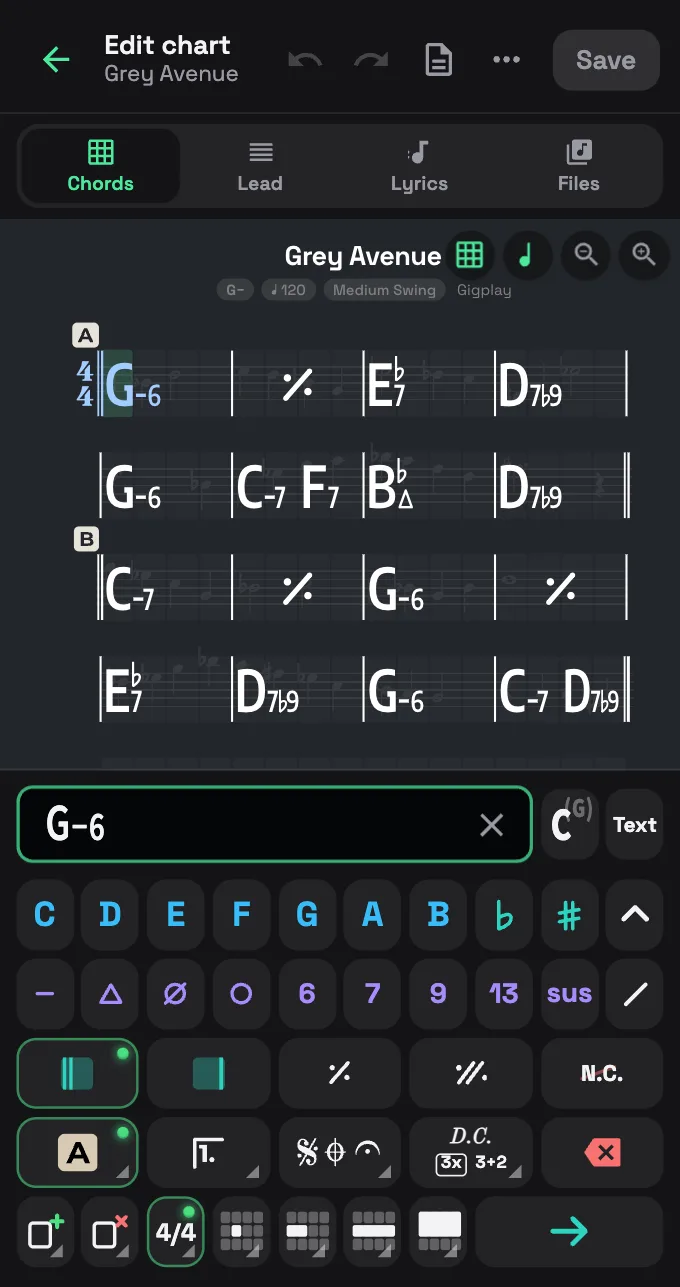
In Gigplay, the chord editor is a grid of bars and cells with a keyboard made for chords, with keys for repeats, endings, segno, coda, D.S. and D.C., N.C. and bar repeats (see Writing and editing a chart). It spells chords for the new key when you transpose, and Chords as shows the same chart as letters, Do Re Mi, jazz or classical Roman numerals, or Nashville numbers. Settings, Chords, chooses how each kind of chord is written (Cmaj7, CM7, Cma7…) whatever the chart says.
A test chart to type into every app
Use the same 16 bars in each app you try, so you compare like with like. It is written for this article, in B♭, and has most of what trips apps up.
| Line | Bar 1 | Bar 2 | Bar 3 | Bar 4 |
|---|---|---|---|---|
| 1 | ‖: B♭maj7 | B♭maj7/D | E♭maj7 | E♭m6 |
| 2 | Dm7 | Dm7♭5 G7♭9 | 1st ending: Cm7 F7 :‖ | 2nd ending: B♭6 |
| 3 | Fm7 B♭7 | E♭maj7 | % | N.C. |
| 4 | Cm7 | F7 | B♭6 | B♭6 (fermata) |
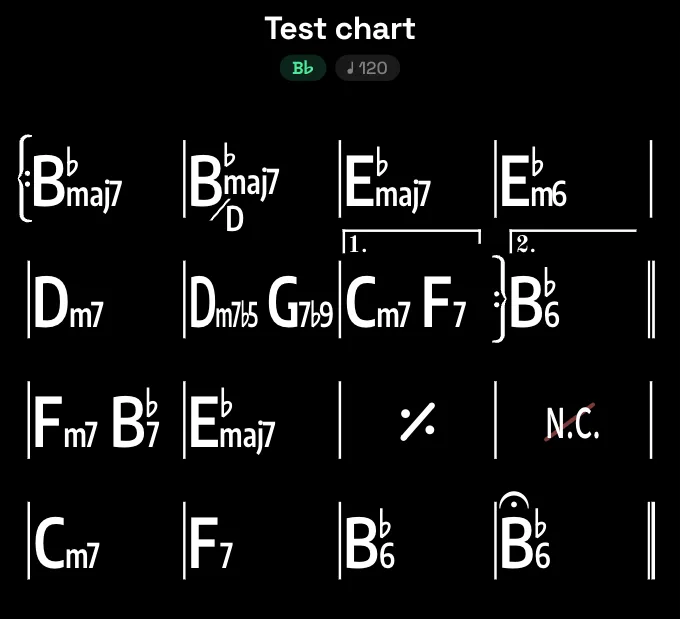
Now:
- Type it in. Note how long it took and what you had to fake with text.
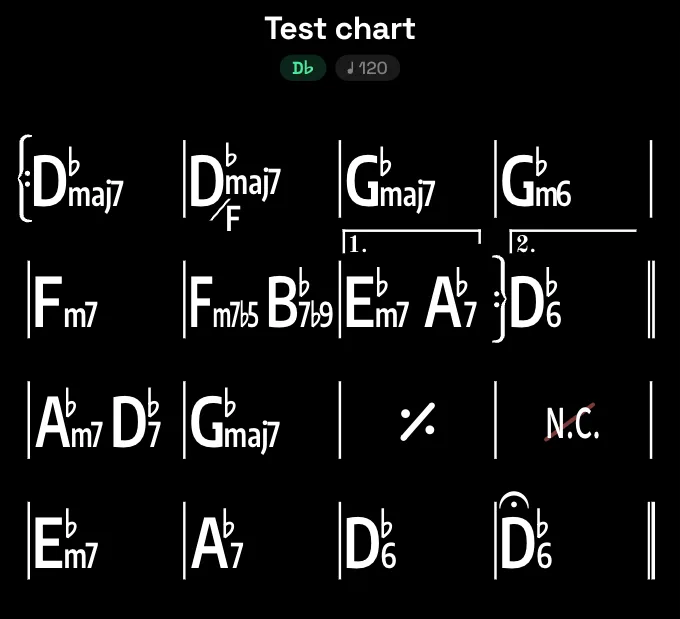
- Transpose it up a minor third, to D♭. Line 1 should read D♭maj7, D♭maj7/F, G♭maj7, G♭m6; line 2 Fm7, Fm7♭5 B♭7♭9, E♭m7 A♭7 (1st ending), D♭6 (2nd ending). Any C♯, F♯ or A♯ there is a fail.
- Show it as numbers. In B♭, bar 1 of line 2 is 3m7 (Nashville), IIIm7 (jazz Roman numerals) or iii7, also written iiim7 (classical Roman numerals).
- Switch to a dark page, put the device on a stand and read it from where you play.
- Export it as a PDF, and in whatever text format the app offers, and open both somewhere else.
What should you avoid?
- Charts stored as pictures. An app that only displays PDFs can't transpose them. Attaching a PDF to a song is useful; relying on it is not (see transposing a PDF).
- Autocorrect on chord text. A phone keyboard "correcting" Bbm7 into a word is a sign the app never had chord entry in mind.
- Sign-in to read your charts, or charts that live only in someone's cloud.
- No export. The day you change apps, you lose your library.